

From Confluence to inbox: best practices for sharing content by email
Confluence is often the source of truth for team knowledge, policies, project updates and company information. Email is still one of the easiest ways to make sure people actually see that information.
The best approach is not to copy everything from Confluence into an email. Instead, build a simple workflow:
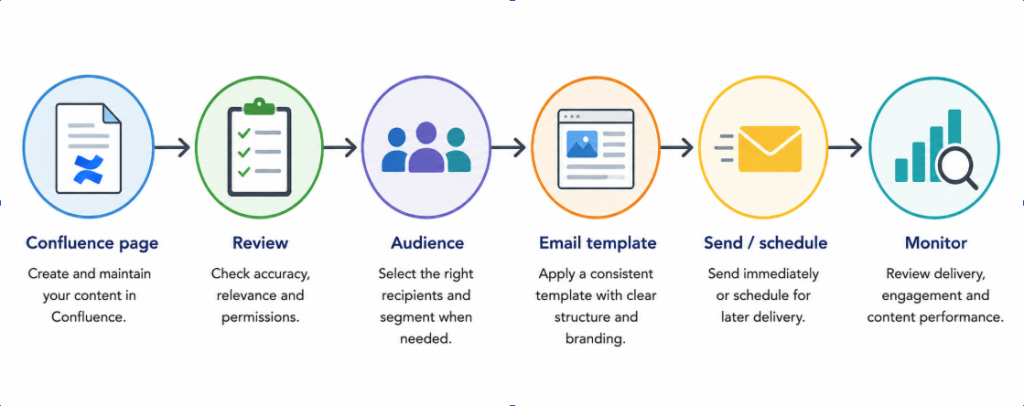
Create → review → format → select audience → send or schedule → monitor
Keep the original content in Confluence. Use email as the distribution channel. This makes communication easier to manage, more consistent and less dependent on manual copy-paste work.
The key takeaway: Effective Confluence email distribution is not simply about sending a page. It is about building a reliable workflow around content ownership, audience, timing, formatting and governance.
Why email can complement Confluence content
Confluence works well as a central place for teams to create, organize and maintain knowledge. It is where the latest version of a policy, project update or announcement can live.
But not everyone checks Confluence every day.
Some employees may work mainly in Jira. Others may only visit Confluence when they need specific information. External partners and customers may not have access to your Confluence site at all.
This is where email can help.
Confluence already allows users to share content by email. The standard Share option sends recipients a link to the relevant content.
That works well when the recipient needs to open the page and collaborate on it.
For other situations, it can be more useful to deliver the actual content in the email. This is particularly relevant for newsletters, recurring reports, important announcements and audiences who do not regularly work in Confluence.
The important distinction is simple:
Confluence stores the information. Email helps distribute it.
Best practices for sending Confluence content by email
Sending a Confluence page by email is easy. Building a reliable process around it takes a little more thought.
1. Keep Confluence as the source of truth
Avoid creating a separate version of important information in email.
Instead, create and maintain the content in Confluence. The email should distribute it.
For example, if your security team publishes a new password policy, the policy should remain in its dedicated Confluence page. The email can explain what changed and provide the relevant content or link.
This reduces the risk of outdated information being shared.
2. Decide between full content and a link
Not every page needs to be sent in full.
A link is usually better when:
- The page is long or frequently updated
- Readers need to comment or collaborate
- The page contains interactive Confluence content
- The recipient needs the latest version every time they open it
Full email content can make more sense when:
- The message is an announcement
- You are sending a newsletter
- The information needs high visibility
- Recipients rarely use Confluence
- You are sending a recurring report or update
The right choice depends on what the recipient needs to do next.
3. Keep the email focused
A common mistake is treating email like a copy of the entire Confluence space.
Don't.
Start with the most important information. Use clear headings, short paragraphs and relevant links.
If an email contains five unrelated project updates, readers may miss the one that actually matters to them.
4. Use consistent templates
For recurring communication, create a recognizable format.
A simple newsletter template might include:
Company updates
Short overview of the most important news.
Project updates
Key milestones, risks and upcoming activities.
Important reminders
Policies, deadlines or required actions.
What's next
Links to relevant Confluence pages.
A consistent structure makes newsletters easier to scan and easier to maintain.
5. Segment your audience
Not everyone needs the same information.
Consider separating recipients by:
- Team
- Department
- Project
- Role
- Customer or partner group
- Location
- Level of access
For example, a product team may need sprint and release updates, while the finance team may only need company-wide announcements.
Good Confluence content distribution is as much about who receives the information as it is about what you send.
6. Schedule recurring communications
If you send the same type of update every Monday, once a month or after each reporting period, manual sending can quickly become repetitive.
A Confluence email scheduler can help automate this part of the process.
The goal is not to automate communication for its own sake. It is to make a repeatable process less dependent on someone remembering to send an email.
7. Review permissions and external recipients
Before sending Confluence content outside your organization, check who will receive it and whether the information is appropriate for that audience.
This is especially important for:
- Security information
- Internal policies
- Customer information
- Project documentation
- Confidential business information
Remember that sharing a Confluence page does not automatically give someone permission to view or edit it. Recipients still need the appropriate access.
For external communication, establish clear rules for which spaces and content can be distributed.
8. Give every recurring communication an owner
A scheduled newsletter should not become something that "just sends itself".
Assign an owner who is responsible for reviewing the content, recipient list and timing.
This small step can prevent outdated announcements from being sent months after they stopped being relevant.
Common use cases for Confluence email distribution
Internal newsletters
A company can maintain its weekly or monthly newsletter in Confluence and use it as the central content source.
The email then brings the latest updates directly to employees' inboxes.
This is useful for companies where not everyone regularly visits Confluence.
Project and team updates
Project information often lives in Confluence, while stakeholders may spend more time in email or Jira.
A weekly project summary can highlight:
- Progress
- Completed milestones
- Current risks
- Upcoming activities
- Decisions that need attention
The detailed project documentation can remain in Confluence.
Security and policy communications
Security and compliance updates are good examples of information that should not rely on people discovering a Confluence page by themselves.
For important changes, email can provide an additional distribution channel and make the update more visible.
Confluence itself also supports email notifications and daily digests for watched content.
Customer and partner communications
Some organizations need to share selected information with customers, suppliers or partners.
In these cases, content governance becomes particularly important. Only approved content should be distributed, and external recipients should be carefully managed.
Recurring reports and updates
Monthly reports, operational summaries and regular status updates are natural candidates for scheduling.
Instead of rebuilding the same email every month, teams can maintain the underlying content in Confluence and automate the distribution.
How to build a reliable Confluence-to-email workflow
A simple process can make the difference between useful communication and inbox noise.
Create → review → format → select audience → send or schedule → monitor
Step 1: Create
Write the source content in Confluence.
Use pages, blog posts, templates and macros where appropriate.
Step 2: Review
Check the information before distribution.
Ask:
- Is it still accurate?
- Is anything missing?
- Is there confidential information?
- Who needs to receive it?
Step 3: Format
Make the email easy to scan.
Use headings, short sections, images and links where they add value.
Step 4: Select the audience
Choose recipients based on their role and information needs.
Avoid sending company-wide emails when a smaller group is enough.
Step 5: Send or schedule
Send one-time communications manually. For recurring updates, consider scheduling them.
Step 6: Monitor
Review delivery, usage and the content being distributed.
For larger communication programs, logs and reporting can also help identify which content is being sent most often.
See the six-step Confluence-to-email infographic below.
Using Mail Page Scheduler & E-Mail Newsletter for Confluence
When teams need more than a simple link-sharing workflow, Mail Page Scheduler & E-Mail Newsletter for Confluence can help turn Confluence into a structured email distribution channel.
The app supports sending the full content of Confluence pages and blog posts by email. It can also combine content using Confluence's Include Page and Excerpt macros.
That can be useful for newsletters where several existing pages need to come together in one email.
For recurring communication, the scheduling manager allows teams to automate email dispatch. This is useful for weekly updates, monthly newsletters and regular reports.
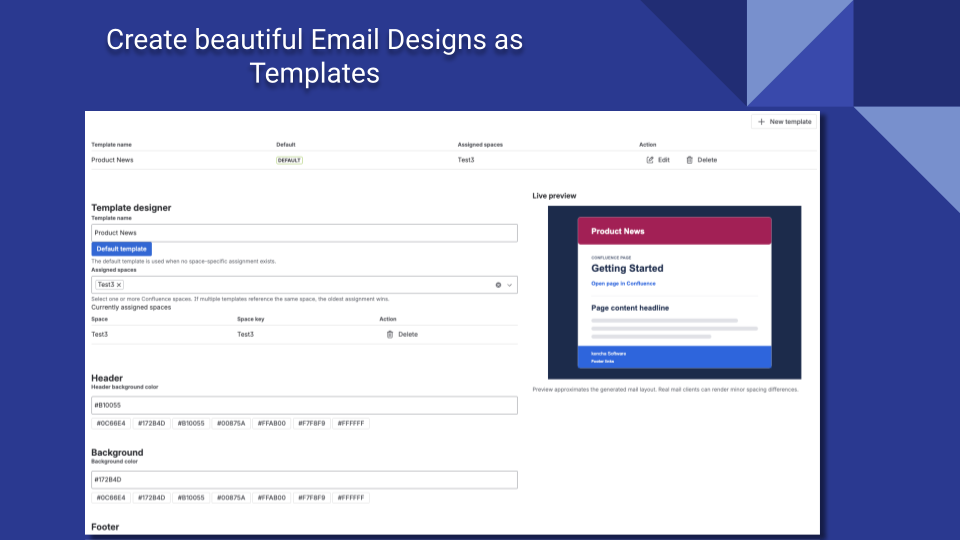
Templates are another important part of the workflow. Teams can create different email designs and keep their communications consistent with their company identity.
Recipient management is also built into the workflow, including To, CC and BCC fields. For governance, administrators can restrict functionality by spaces, users or groups and define domain whitelists or blacklists.
The app also provides global and space-level logs, as well as reporting on mail volume and top content. This can be useful when email distribution becomes part of a larger communication process.
Try Mail Page Scheduler & E-Mail Newsletter for Confluence.
Common mistakes to avoid
Even a good Confluence email workflow can fail if a few basic rules are ignored.
Sending too much content: Long emails are difficult to read. Prioritize what matters.
Emailing every Confluence update: Not every page change deserves an email. Use notifications selectively.
Letting the email become the source of truth: Keep important information maintained in Confluence.
Using overly broad recipient lists: More recipients do not always mean better communication.
Relying on manual copy-paste: Recreating the same newsletter every week increases the chance of errors.
Ignoring external recipients: Always review external addresses and content before sending.Changing the newsletter format every time: Consistency helps readers recognize and navigate recurring communications.
Scheduling without ownership: Every recurring communication should have someone responsible for reviewing it.
FAQs
Can you send a Confluence page by email?
Yes. Confluence lets users share pages by email, typically by sending recipients a link to the page. If you want to send the full Confluence page content directly to an inbox, Mail Page Scheduler & E-Mail Newsletter for Confluence provides this functionality, along with options for scheduling, templates and recurring email distribution.
What is the best way to email Confluence pages?
It depends on the use case. Send a link when recipients need to collaborate on the live page. Send the content itself when visibility, newsletters or recurring communication are more important.
Can Confluence pages be scheduled for email delivery?
Yes. Dedicated Confluence email scheduler can automate recurring communications, such as weekly newsletters, monthly reports or regular project updates.
Can multiple Confluence pages be included in one email?
Yes. Mail Page Scheduler & E-Mail Newsletter supports combining content from multiple pages through the Include Page and Excerpt macros.
How can teams create Confluence newsletters?
Create and maintain the newsletter content in Confluence, organize it into clear sections, select the right audience and use a reusable email template. For recurring newsletters, scheduling can remove repetitive manual work.
How should organizations manage external recipients?
Use clear governance rules. Review the content, recipient list and permissions before every external communication. Domain restrictions and user or group-based controls can add another layer of protection.
When should you send a Confluence page instead of a link?
Send the full content when readers need to consume the information directly from their inbox. Use a link when they need to work with the live Confluence page, comment on it or access frequently changing information.
Final takeaway
The goal of Confluence email distribution is not simply to send a Confluence page by email.
It is to build a communication process that people can rely on.
Keep Confluence as the source of truth. Choose the right audience. Keep emails focused. Use consistent templates. Schedule recurring communication when it makes sense. Most importantly, give the process clear ownership and governance.
When these pieces work together, email becomes more than another notification channel. It becomes a practical way to bring important Confluence content to the people who need it, when they need it.
About the Author

Anahit Sukiasyan is an Atlassian Certified Professional and Community Champion, recognized for her dedication to fostering collaboration, innovation, and knowledge-sharing within the global Atlassian ecosystem. With a strong background in IT Service Management, she has extensive hands-on experience with Jira, Jira Service Management, Confluence, Trello, and Jira Product Discovery, working across both Cloud and Data Center environments. Anahit specializes in end-to-end Jira project configuration, tailoring workflows, automation, and reporting to align with diverse business needs and improve operational efficiency.
Beyond her technical skills, Anahit is deeply committed to building and nurturing communities. Being an organizer of the Atlassian Community in Yerevan, she actively connects professionals, facilitates learning opportunities, and empowers users to get the most out of Atlassian tools.