
From blank space to ready-to-use workspace: how to standardize Confluence space creation
Creating a new Confluence space sounds simple.
Give it a name, choose the right settings, create a homepage, add a few pages and start working.
The problem starts when you need to do this again. And again.
A project team needs a space. Then another department needs one. A new customer gets onboarded. A new product needs its own documentation. Before long, teams are rebuilding almost the same Confluence structure over and over again.
This is where Confluence space templates can make a real difference.
Instead of starting from an empty space every time, teams can reuse a structure that has already been tested and proven to work.
TL;DR
If your organization creates similar Confluence spaces regularly, standardizing the process can save time and reduce inconsistencies.
A good Confluence space template should include:
- A clear page hierarchy
- Useful starter content
- Consistent labels and naming
- Working internal links
- Relevant attachments
- Appropriate permissions and ownership
The most practical approach is to start with an existing space that already works well, turn it into a reusable blueprint, and give users a simple way to create new spaces from it.
For teams that need more control over this process, Space Clone Manager for Confluence can be used to create reusable templates from existing spaces and make them available through a Template Gallery.
Why creating a new Confluence space can become repetitive
Confluence already provides ways to create spaces for different purposes. Depending on the setup, users can create collaboration, knowledge base or custom spaces, and Confluence also provides templates to help teams get started.
But organizations often need something more specific.
Imagine your company creates a project space for every major initiative.
Each one needs:
- A project overview
- Goals and scope
- Meeting notes
- Documentation
- Decision logs
- Planning pages
- Resources
- A standard navigation structure
Without a reusable structure, someone has to recreate these pages every time.
That creates several problems. Some pages get forgotten. Different teams create slightly different versions. Internal links can be copied incorrectly. And administrators have less control over the standards used across the organization.
The real challenge is not simply how to create a Confluence space.
It is how to create one consistently and efficiently at scale.
When should you use a Confluence space template?
A template is useful when the same type of space is created more than once.
Common examples include:
- Project spaces
- Department spaces
- Product documentation
- Customer spaces
- Employee onboarding
- Knowledge bases
- Service documentation
- Recurring project environments
A simple rule can help:
If your team keeps rebuilding the same structure, the first well-designed space can become the blueprint for the next one.
Confluence itself supports different types of templates and blueprints. However, teams may still need a more specific structure based on their own processes and standards.
What makes a good Confluence space template?
Creating a template is not just about copying a few pages. The goal is to create a useful starting point.
A clear page hierarchy
People should know where to find information without having to think about it.
For example:
Home → Overview → Planning → Documentation → Meetings → Decisions → Resources
The exact structure will depend on your use case. What matters is that it is logical and repeatable.
Reusable content, not just empty pages
An empty page called "Meeting notes" is not always enough.
A better template might include the structure your team actually uses:
Meeting date:
Participants:
Agenda:
Decisions:
Action items:
This gives people a starting point instead of another blank page.
Consistent labels and organization
Labels and naming conventions may seem like small details, but they become important when your Confluence environment grows.
Agree on basic conventions before creating multiple templates. This makes content easier to find and maintain.
Links and navigation that continue to work
This is an easy detail to overlook.
If pages contain links to other pages in the original space, those links need to remain useful after the structure is copied.
A template that looks perfect but contains broken or misleading links will create more work later.
How to build a scalable Confluence space creation workflow
A simple workflow can help:
Create → validate → standardize → publish → reuse → measure → adapt
1. Start with a proven space
Do not necessarily design your template from a blank page.
Look at an existing space that teams already use successfully.
Maybe it is a project space that has been refined over several months. Or a documentation space that people actually find easy to navigate.
That space can become your starting point.
2. Decide what belongs in the template
Not everything needs to be copied.
Decide which elements should become part of the standard:
- Pages and page hierarchy
- Homepage content
- Attachments
- Labels
- Navigation
- Supporting documentation
Also consider what should stay specific to each individual project or team.
3. Define who can use and manage templates
Not every user needs to create or modify organizational templates.
For example, you might have:
Administrators: manage the overall setup
Template managers: maintain approved templates
Users: create new spaces from available templates
This creates a clearer governance model.
4. Make templates easy to find
Having 20 templates is not useful if nobody knows which one to choose.
A centralized gallery can help users browse templates, search for the right one and understand what each template is designed for.
5. Review and adapt templates based on usage
Templates should not be "set and forget".
Once a template is published, look at how people actually use it. Usage data can tell you more than just which templates are popular. It can also highlight where something in the process may need attention.
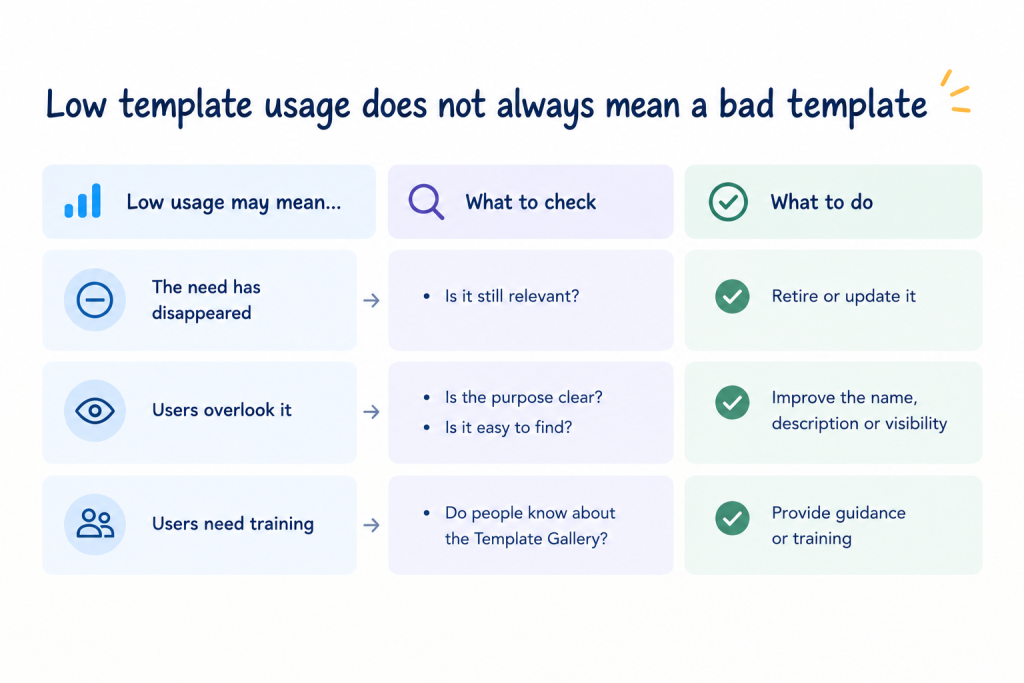
For example, if a template is rarely used, there could be several reasons:
- The original need for the template may no longer exist.
- Users may overlook the template because they do not understand what it is designed for.
- The template name or description may not make its purpose clear.
- Users may not know that the template is available in the Template Gallery.
- Teams may not have been properly introduced to the template and continue creating blank spaces instead.
This makes template reporting useful for more than measuring adoption. It can help teams decide what to improve.
A rarely used template may need to be removed. Another may simply need a clearer description, better visibility or some user training.
The important part is to learn from the data and adapt rather than assuming that a published template will automatically become part of the team's workflow.
From one successful space to a reusable blueprint
There is an important difference between copying a space once and creating a reusable standard.
A one-time copy solves one immediate problem.
A reusable template creates a repeatable process.
For example, imagine your product team has built a documentation space that works particularly well. It has a clear hierarchy, useful labels, supporting attachments and navigation that users understand.
Instead of asking every new product team to recreate that structure, you can turn the existing space into a reusable template.
The next team can start from the same foundation and then adapt it to its own needs.
This is where standardization becomes more than a productivity trick. It also introduces ownership, governance and consistency.
Using Space Clone Manager for Confluence to standardize space creation
Space Clone Manager for Confluence is designed around this idea: take an existing Confluence space and turn it into something that can be reused.
Instead of rebuilding a structure manually, teams can create reusable templates from existing spaces and make them available through a centralized Template Gallery.
Create reusable templates from existing spaces
Start with a space that already represents the structure you want to repeat.
This can be particularly useful for project, documentation, onboarding or department spaces.
Launch spaces from a Template Gallery
As the number of templates grows, discoverability becomes important.
The Template Gallery provides a central place for users to find available templates. Categories, filters and search can help users choose the right starting point.
Copy page hierarchies and supporting content
A useful template needs more than a homepage.
The app can copy the homepage and child page hierarchy, along with attachments and labels.
Keep internal links usable
Internal links are one of the details worth checking whenever content is copied.
Space Clone Manager includes automatic correction of internal links, helping the cloned structure remain usable in its new space.
Apply role-based access
Organizations may want different people to use templates and manage them.
Role-based permissions can help separate these responsibilities, which becomes particularly useful in larger Confluence environments.
Monitor template usage and learn from the data
Creating a template is only the first step. The next question is whether people actually use it.
Space Clone Manager provides reporting and diagnostics that can help teams monitor template usage and changes.
This can give administrators a better basis for deciding what to do next. If a template is used frequently, it may be worth keeping and improving. If it is rarely used, the numbers can prompt a closer look.
Is the template still needed? Is its purpose clear? Do users know where to find it? Have teams been properly introduced to the Template Gallery?
Sometimes low usage points to an outdated template. In other cases, the template may still be useful, but users simply do not know about it or understand when to use it.
The goal is not to increase template usage just for the sake of it. The goal is to understand usage patterns and use them to keep the template library relevant and useful.
Common mistakes when standardizing Confluence spaces
Templates can create problems if they are designed without enough thought.
Avoid these common mistakes:
- Creating templates that are too generic
- Trying to standardize every detail
- Using an outdated space as the source
- Not assigning an owner
- Ignoring permissions and restrictions
- Forgetting attachments or labels
- Not checking internal links
- Publishing a template without testing it
- Never reviewing template usage
- Creating several competing versions of the same template
A good template should make work easier, not add another layer of administration.
A practical checklist for better Confluence space creation
Before creating a template, ask:
- Is this type of space created regularly?
- Is the source space already proven to work?
- Which pages should be included?
- Which labels and attachments should be copied?
- Are the internal links still relevant?
- Who can use the template?
- Who can manage it?
- How will users find it?
- When will the template be reviewed?
Before launching a new space:
- Choose the appropriate template
- Review the page hierarchy
- Confirm permissions
- Check the copied content
- Adapt the space to the specific team or project
- Remove anything unnecessary
- Check links and navigation
- Assign an owner
The goal is not to make every Confluence space identical.
The goal is to give teams a reliable starting point while still leaving room for the work itself to be different.
FAQs
What is a Confluence space template?
A Confluence space template is a predefined structure that helps teams create a new space with consistent content and organization instead of starting from scratch.
Can you create a template for an entire Confluence space?
Confluence provides space types and blueprints, while organizations can also create custom templates for their needs. The exact capabilities depend on the Confluence version and setup.
How do I copy a Confluence space?
The approach depends on what you want to copy and your Confluence environment. For organizations that repeatedly need the same space structure, a dedicated space cloning or templating approach can provide a more repeatable workflow.
Can I create a new Confluence space from an existing space?
Yes, this is a common approach when the existing space already contains a structure that another team or project needs. The key is to make the process repeatable and controlled rather than relying on manual copy-paste each time.
What is the difference between a Confluence template and a blueprint?
Atlassian describes blueprints as templates created by Atlassian or third-party developers with additional functionality. From an end-user perspective, they can look similar, but they have different administration capabilities.
How can teams standardize Confluence spaces?
Start with a proven space, define the structure and content that should be reused, establish ownership, make templates easy to find and review them regularly.
Can different users have different access to Confluence templates?
Yes. Access and administration can be controlled based on the Confluence setup and the tool used to manage templates.
How can teams maintain consistent Confluence spaces as they grow?
Create a small set of well-designed templates, assign owners, avoid unnecessary variations and review the templates regularly. Standardization works best when it supports the way teams actually work.
Final thoughts
Creating a Confluence space should not become a project of its own.
If your teams repeatedly build similar spaces, take a step back and look at what they are rebuilding. There is probably a structure worth turning into a reusable template.
Start with one good space. Clean it up. Test it. Define who should use it. Then make it easy for others to reuse.
That is a much more sustainable approach than asking every team to start from an empty Confluence space.
If you want to make this process easier, try Space Clone Manager for Confluence to turn proven spaces into reusable templates and give your teams a simpler way to get started.
About the Author:

Anahit Sukiasyan is an Atlassian Certified Professional and Community Champion, recognized for her dedication to fostering collaboration, innovation, and knowledge-sharing within the global Atlassian ecosystem. With a strong background in IT Service Management, she has extensive hands-on experience with Jira, Jira Service Management, Confluence, Trello, and Jira Product Discovery, working across both Cloud and Data Center environments. Anahit specializes in end-to-end Jira project configuration, tailoring workflows, automation, and reporting to align with diverse business needs and improve operational efficiency.
Beyond her technical skills, Anahit is deeply committed to building and nurturing communities. Being an organizer of the Atlassian Community in Yerevan, she actively connects professionals, facilitates learning opportunities, and empowers users to get the most out of Atlassian tools.